Now available on the App Store

Stop losing eBay auctions while you're not watching.

Aucword puts live countdowns, price-target alerts, and a home screen widget on top of the eBay watchlist you already have — built for card and collectibles buyers who can't watch every auction end.

5.0 from 4 ratings on the App Store

Free · iOS 17+ · Android coming soon · eBay account required

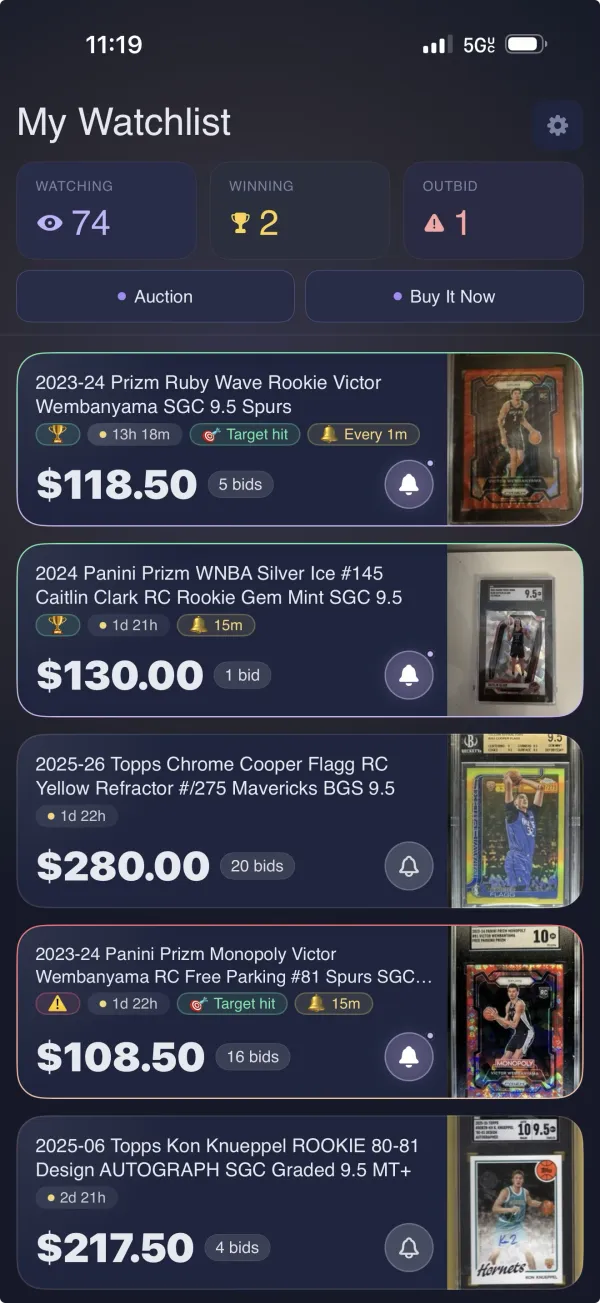
Aucword app showing a watchlist of sports card auctions with live countdowns, price alerts, and bid counts
The Problem

Sports card auctions end while you're not looking.

You add cards to your watchlist and then forget. The auction ends at 2am, or while you're at work, or in the middle of dinner. By the time you check, someone else got the card you wanted — for less than you would have paid.

What you get

Live countdowns, smart alerts, and a watchlist widget.

Live Auction Countdowns

Every auction on your watchlist shows a real-time countdown, colour-coded by urgency. A Lock Screen countdown keeps the closest one in front of you without opening anything.

Smart End-of-Auction Alerts

Set the most you'd pay on any item and get a push before it closes. Aucword watches the bidding so you don't have to keep refreshing eBay.

eBay Watchlist Widget

A home screen widget showing what's ending soonest, with the current bid and time left on each. Glance instead of opening the app.

How it works

From eBay watchlist to alert in three steps.

1

Connect your eBay account

Sign in through eBay once. The watchlist you already have imports automatically — nothing to re-add by hand, and Aucword never sees your password.

2

Set your price targets

Pick the most you'd pay on the items you care about. Aucword tracks the current bid against your number.

3

Get alerted before it ends

Countdowns on your Lock Screen, a widget on your home screen, and a push notification with time left to bid.

Questions

Frequently asked

Does Aucword work with my existing eBay watchlist?
Yes. Sign in with eBay once and the watchlist you already have imports automatically. There is nothing to re-add by hand.
Will Aucword bid for me?
No. Aucword never places a bid. It tracks your auctions and tells you when to act — you place the bid on eBay yourself.
Do I need to give Aucword my eBay password?
No. Signing in goes through eBay's own OAuth flow, so your password is entered on eBay's site and never reaches Aucword.
What alerts can I get before an auction ends?
You can set a price target per item and get a push notification when an auction is closing in or reaches the price you set. Alerts can fire once or repeat.
Does it work when the app is closed?
Yes. Alerts arrive as push notifications, and the home screen widget and Lock Screen countdown keep updating in the background.
Is Aucword free?
Yes. Aucword is free to download and use, with no subscription.
Does it work for anything besides sports cards?
Yes. Aucword works with any eBay auction on your watchlist. It's built with card and collectibles buyers in mind, but nothing is category-specific.
When is the Android version coming out?
An Android version is in active development. Follow @aucword and we'll post the day it lands.
How do I delete my account?
Open Settings in the app and choose Delete Account. Full instructions, including what gets deleted, are on the account deletion page.

Your next win is
waiting in your watchlist.

Aucword is free on the App Store. Download it and never miss another auction.

Download for Free